Products · Whiteboard Design
Wire the studios together.
Every other studio answers one brief and stops. A board is where the answer keeps going: drop a picture, wire it into the cards that work from it, and each run feeds the next. Same studios, same credits - laid out so you can change one card without re-running the rest.
Why a board
An output is the next card's input.
Everything a board does is on its face, so this is a real one rather than a diagram of one: a product shot brought in at the top left, one wire, and a campaign card that has run - the picture it was sent, the four it sent back, and a ring on the one the next card would work from.
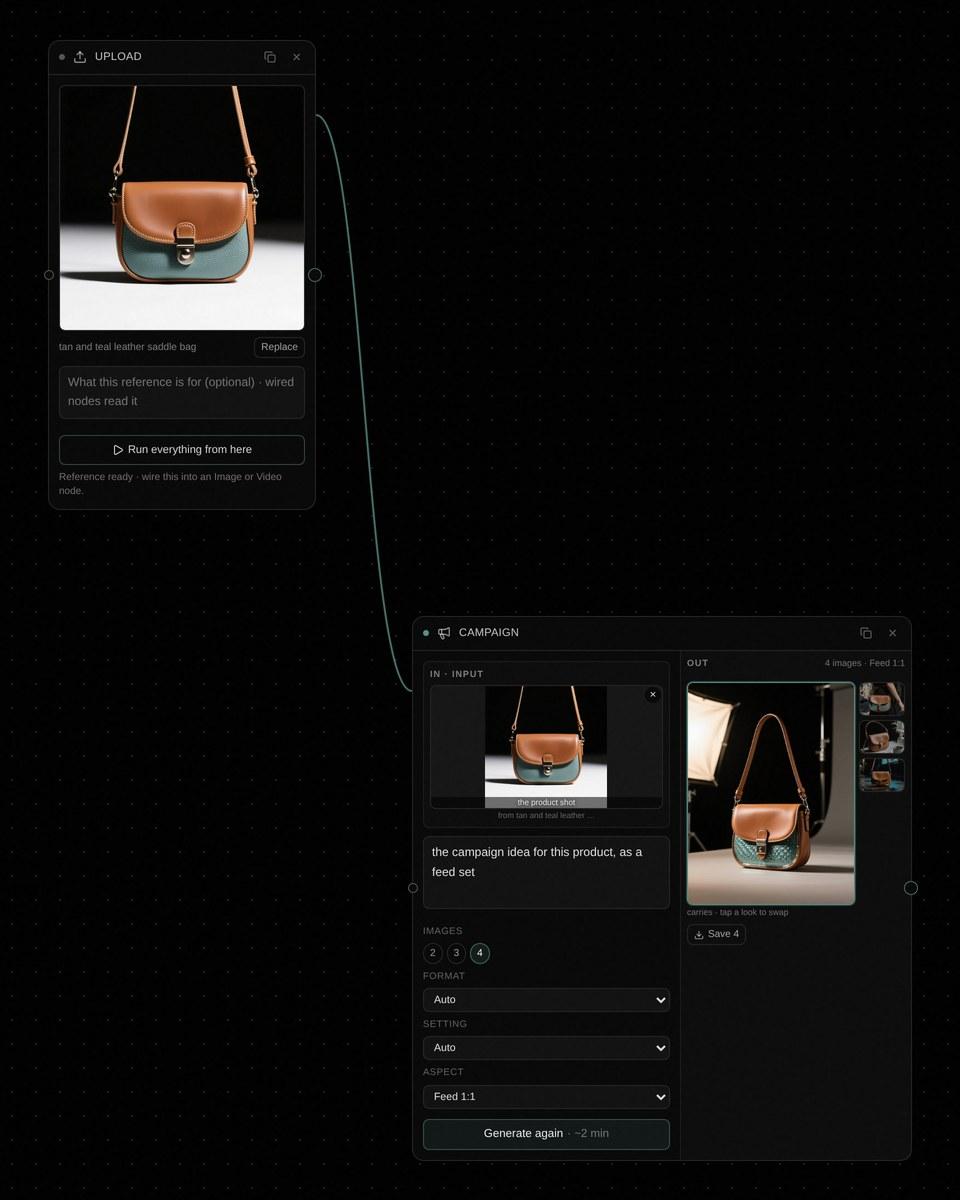
The card holds both ends
Every generating card has an IN frame and an OUT frame. The IN shows exactly the picture the run will send; the OUT shows what came back. Nothing about a card is hidden behind a modal.
The wire is the argument
Drawing from one card to another is not decoration - it resolves to a real backend argument. An upload wired into a campaign card becomes that run's reference image, and the board says which picture that is.
One of the looks carries
A run that returns four pictures marks the one the next card works from, and tapping another promotes it. Continuing from the third look is a click, not four re-runs until it comes out first.
Start from one
8 boards, already drawn.
Pick one and the cards land wired, with every option already set and an example picture in the source slot. Nothing runs until you press Run - so you look at the shape first, change what you want, and only then spend anything.
Product, every angle
6 cardsOne product shot becomes the pack shot, three more angles and a lifestyle set. The spread a storefront listing needs.
On a model
4 cardsThe garment on the left, the model on the right, and the look worn below — then a close crop of how it falls.
Campaign set
6 cardsOne product shot becomes five boxes: the feed set, a lifestyle set, the detail, the story crop and a clip cut from it.
A look and its pieces
6 cardsA bag and a pair of shoes drop onto a model already dressed — her outfit kept, the pieces added — then the look goes out as a street set.
Photo to product pack
4 cardsOne photograph of a sample becomes the pack shot, the technical flat a factory reads, and the range in colour.
Break a garment down
7 cardsOne garment photograph becomes the material, the cloth up close, how it is finished, how it is joined, the technical flat, and a written read of what it is made of.
Sketch to shelf
4 cardsA drawing becomes a product photograph, a clean pack shot and the material on its own.
One hero, every format
5 cardsA single hero image cut to feed, story and banner, with a story clip. The set a storefront asks for every drop.
Get started
One picture in. A whole board out.
Bring a product shot and leave with the set - angles, campaign frames, the flat, the clip - laid out on one canvas.
Keep exploring
Related tools & solutions.
The Ad Agency
The card that turns one product shot into ad-ready images.
The Looking Glass
The card that puts a garment on a model, and keeps the outfit for an accessory.
The Darkroom
The card that renders editorial stills from a written brief.
Pattern Office
Where the technical flat a board draws goes next.
End-to-End Execution
The same chaining, run for you from a single brief.
E-commerce & DTC
Why a storefront needs the same six frames of every drop.